
SoPilot - Put X engagement on autopilot
From discovering hot tweets to generating AI comments, publishing them, and avoiding duplicate engagement, SoPilot turns repetitive daily interaction into a controlled, stoppable, trackable growth workflow.
Three engagement modes for daily growth
Choose the right target source for your operating goal: timeline for daily presence, hot tweets for timely comment placement, and URL batches for curated target lists.
Timeline Automation
Best for daily account activity and reaching your target circle. Open a following list, search results page, or any X feed, and SoPilot will scroll, filter, like, and comment based on your rules.
Hot Tweets Automation
Best for entering high-potential comment sections early. SoPilot processes hot tweet sources by round, opens target posts, and generates quality comments before the traffic window closes.
Batch URL Engagement
Best when you already have a curated list of tweet links. Enter one URL per line, and SoPilot opens each target, skips duplicates, and records succeeded, failed, and skipped results.
Configure automation in four steps
Define the target source, choose actions and filters, then let the extension run at your configured cadence. The workflow is automated, stoppable, and easy to adjust.
Turn X engagement into a configurable workflow
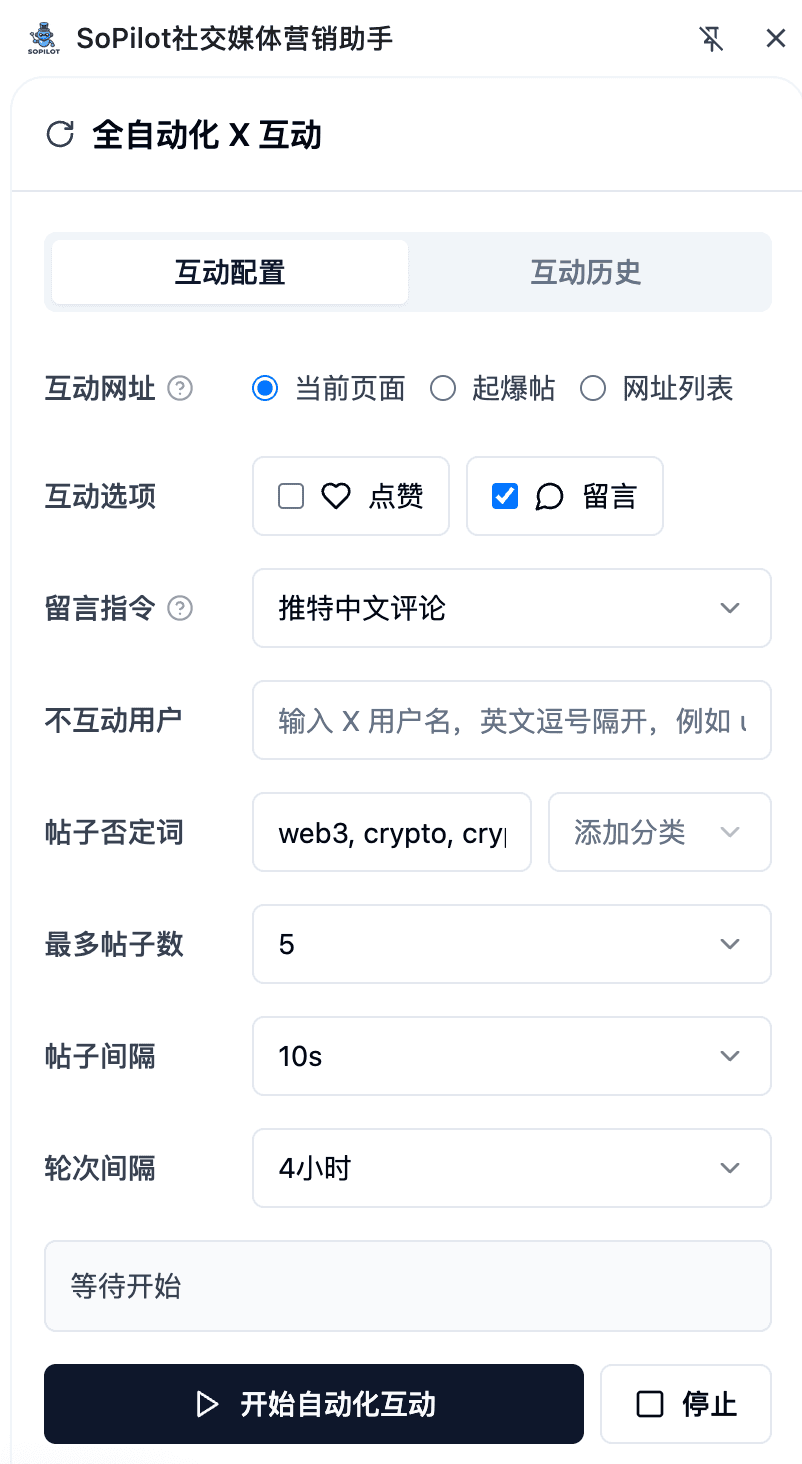
Configure target sources, engagement actions, comment prompts, skip rules, and execution intervals from the extension side panel. Once started, keep the browser idle while SoPilot runs.
Choose current page, hot tweets, or URL list as the target source
Select likes, comments, and a content-generation comment agent
Set excluded users, negative keywords, post limits, and round intervals
Start automation to open target tweets, generate comments, publish, and save history
What the extension automates
Designed around real X operating workflows, automated engagement supports current-page scanning, hot tweet tracking, multi-URL batches, direct comments, failure tolerance, and 24-hour history.
Hot Tweets Automation
Multi-URL Batches
AI Comment Publishing
Skip Low-Value Posts
Intervals and Rounds
Engagement History
A more natural operating cadence
SoPilot does not blindly process every post. It combines random skips, wait intervals, keyword filters, and excluded users to keep engagement more selective and natural.
Custom Comment Prompt
Failure Tolerance
Separate Like and Comment
FAQ
Yes. Automated X engagement runs inside the SoPilot Chrome extension side panel, which opens X pages, generates comments, and performs engagement in your browser.
Yes. You can select hot tweets as the target source, and SoPilot will process high-potential posts based on your post limit and round interval settings.
SoPilot keeps engagement history from the last 24 hours and skips already processed tweets during batch URL and direct engagement workflows.
You can configure post intervals, round intervals, excluded users, and negative keywords. SoPilot also skips overly short content and keeps a waiting cadence while running.
Do I need to install the extension?
Can I engage only with hot tweets?
Will it comment on the same tweet twice?
How do I keep engagement from feeling mechanical?
Best-fit growth scenarios
Useful for teams and creators who need to secure early comment positions, batch process target tweets, or run frequent but controlled engagement around hot posts.
Install SoPilot Extension