
How to Generate Topics
After your column is set up, it is usually better not to jump straight into writing full drafts. Generate a batch of topics first.
What makes a column sustainable is not one lucky idea. It is building a topic pool that you can keep selecting from and producing from over time.
Where topic generation happens
Inside an existing column, if there are no topics yet, you will usually see a clear AI Generate Topics entry point.
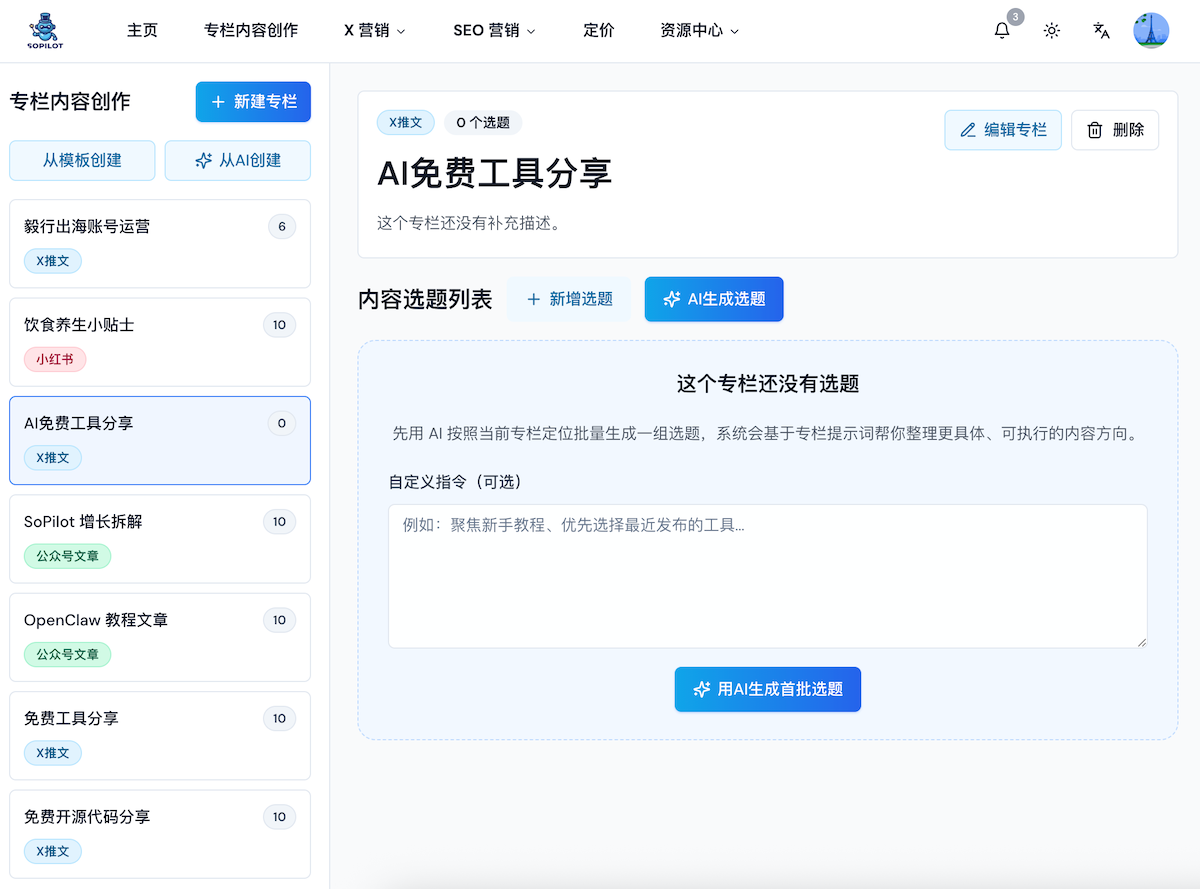
If the column already has some topics, you can still keep generating more.
1. Standard workflow
The recommended flow is:
- open an existing column
- click
AI Generate Topics - optionally fill in
Custom Instruction - click generate
- wait for SoPilot to produce a new batch
- screen the batch and keep only the topics worth writing
The goal here is not quantity for its own sake. It is to open up good directions first, then curate them manually.
Column scope determines the topic structure
The system uses a different generation strategy depending on whether a column is clearly about one named subject:
- A column about one technology, product, tool, or open-source project follows a progressive path around that same subject: what problem it solves, getting started, practical use, advanced work, and a complete guide.
- A broad tool collection, resource-sharing, or trend-roundup column does not turn every topic into a tutorial for the same tool. Each topic prioritizes a different concrete tool, product, or resource, approached through a different scenario.
For example, a “Free Tool Sharing” column covers multiple tools. Only a clearly Habo-only column should generate a continuous Habo series. When the scope is unclear, the system defaults to multiple subjects to avoid repeatedly focusing on one object.
2. When to use custom instructions
Custom Instruction is best for light one-off steering.
For example, you can ask for:
- newer tools or trends from the last 30 days
- more tutorial-style topics and less news-style framing
- topics better suited to beginner sharing
- fewer abstract ideas and more practical methods
- closer fit to your product scenario
If your column positioning is already very clear, you usually do not need to write much here.
3. How to tell whether a topic batch is good
A strong batch usually has these traits:
- it clearly fits the platform type of the column
- a single-subject column has a clear progressive path; tool collections and resource-sharing columns cover different subjects while staying aligned with the same column positioning
- titles have specific angles, not broad vague labels
- you can quickly tell which topics deserve priority
- at least some of them can extend into a series
If most of the topics feel scattered, it usually means the column positioning is still too broad.
4. How to screen topics
After generation, delete weak topics first and keep the best ones.
Common screening standards include:
- whether the topic fits the target platform
- whether it really matters to your audience
- whether it can drive discussion, sharing, or search clicks
- whether it connects to your product, experience, case, or method
- whether it can extend into a series later
- whether you actually have something useful to say on it
5. Practical advice for the first run
If this is your first time using the column, a good approach is:
- generate one batch of topics
- keep the 3 to 5 you most want to write
- generate full drafts for only 1 or 2 of them first
- evaluate whether the draft quality matches your expectation
- then either adjust the column positioning or generate more topics
This is usually much more efficient than generating full drafts for everything at once.
6. Signs you should go back and adjust column positioning
If you repeatedly see patterns like these, it is usually better to stop generating more topics and refine the column settings:
- topics are always too broad
- topics do not fit the platform well
- tone and direction are inconsistent
- the ideas feel like generic trend chasing instead of your long-term direction
- many of the topics are things you would not even want to write yourself
That usually means the Column Description or Column Prompt is still not specific enough.
Common questions
How many topics should I generate at one time?
There is no fixed number. What matters more is getting a useful batch of directions to screen.
If I do not like the first batch, should I regenerate immediately?
You can, but it is often better to check whether the column positioning is too broad before you rerun it.
Do I need to write every topic after generation?
No. The topic pool works like a candidate library. You only need to keep moving the strongest ones forward.
Next step
After screening the topics, continue with How to Generate Drafts.