
How to Generate Drafts
Once you have selected a topic, you can start generating the full draft.
The goal at this stage is not to get a perfect version in one shot. It is to get a structurally solid draft that is easy to improve.
Where draft generation happens
In the topic list, each topic usually has a Generate button on the right side.

After you click it, SoPilot uses the current column configuration and topic context to generate the draft in a streaming flow, then saves it automatically.
1. Standard workflow
The recommended sequence is:
- find the topic you want to write
- click
Generate - wait for AI to finish the draft
- read the overall structure first
- decide whether to keep it, edit it manually, or continue with AI editing
If the current column has Auto Images enabled, image generation may continue after the text draft finishes.
2. What to check the first time you read a draft
Do not start by line-editing. Check the larger structure first.
At minimum, look at:
- whether the opening makes the topic clear quickly
- whether the middle flows in a logical order
- whether each section stays on the same core point
- whether the ending closes clearly or gives a next action
- whether the tone fits the platform
If the large structure is right, detail edits are much easier.
3. What to focus on for different platforms
The quality standard changes by platform:
X Tweet: short, fast, hook-driven, with a clear pointX Article: strong opening hook, argument momentum, and a memorable closeWeChat Article: structured and layered, but still built for spread rather than plain explanationXiaohongshu: clearer topicality, readability, title feel, and image-text alignmentSEO Article: strong intent coverage, but still clearer when it opens with tension and ends with a strong takeaway
If the current column type is X Article, WeChat Article, or SEO Article, SoPilot now prefers the structures from the Viral Article Formula Library instead of generating a generic explainer.
4. What to do when you do not like the draft
There are usually three main options:
- keep it directly
- edit manually
- edit with AI
When manual editing makes more sense
Manual editing is faster when you already know what to fix, such as:
- the title is weak
- one section needs a better example
- the ending is not strong enough
- the tone does not sound like you

When AI editing makes more sense
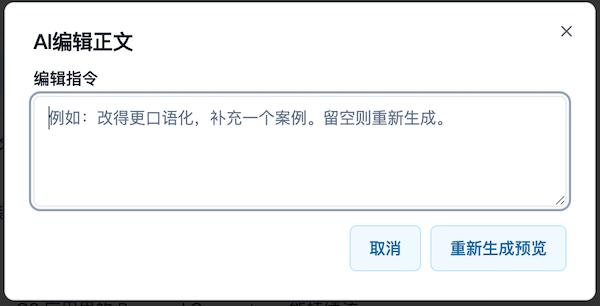
If you know what direction you want but do not want to rewrite everything yourself, describe the change in natural language.
For example:
- make it sound more like a friend talking
- compress it into a stronger X format
- add sharper tension or opinion
- make the example more specific
- remove generic filler sentences
5. Recommended order for revising
To avoid making the draft messier, revise in this order:
- title and opening
- middle structure
- tone, wording, and final details
If you start by obsessing over isolated sentences, it is easy to do a lot of work without actually improving the whole piece.
6. When to go back and change the column settings
If several drafts in a row show the same problems, such as:
- the style is always wrong
- the content always feels too empty
- the structure keeps drifting
- the tone clearly mismatches the platform
Then the issue is usually not the current draft. It is more likely that Column Positioning or Column Prompt needs adjustment.
Common questions
Is it normal for draft generation to take longer?
Yes. Full drafts are usually longer than topic generation, so they naturally take more time.
Do I need to manually edit every draft?
Not always, but before publishing, it is still a good idea to read through the final structure, tone, and accuracy yourself.
If I do not like a draft, should I regenerate or keep editing?
If the overall direction is still okay, editing is usually more efficient. If it is off-track from the beginning, regenerating can make more sense.