
Create a Content Column
Creating a content column is not just filling in a title. It is where you define the positioning and generation rules that the rest of the workflow will reuse.
Many people want to click AI Generate Topics immediately, but if the column itself is too broad or too vague, the content it produces will usually drift too.
So it is usually better to make the base setup clear first, then start producing content in batches.
What you are really doing when you create a column
At its core, you are answering questions like:
- where this content will be published
- who it is mainly for
- what themes the column should keep returning to
- whether the style should feel more like opinion, tutorial, case review, or practical checklist
- whether each piece is mainly meant for reach, conversion, education, or brand expression
The more specific those answers are, the more stable later AI output usually becomes.
Where to start the column creation flow
You can enter this flow in two common ways:
- fill it out when creating a new column
- edit an existing column later through
Edit Column
If this is your first time, the most practical approach is to make a usable first version, then refine it as you generate and learn.
Which fields matter most
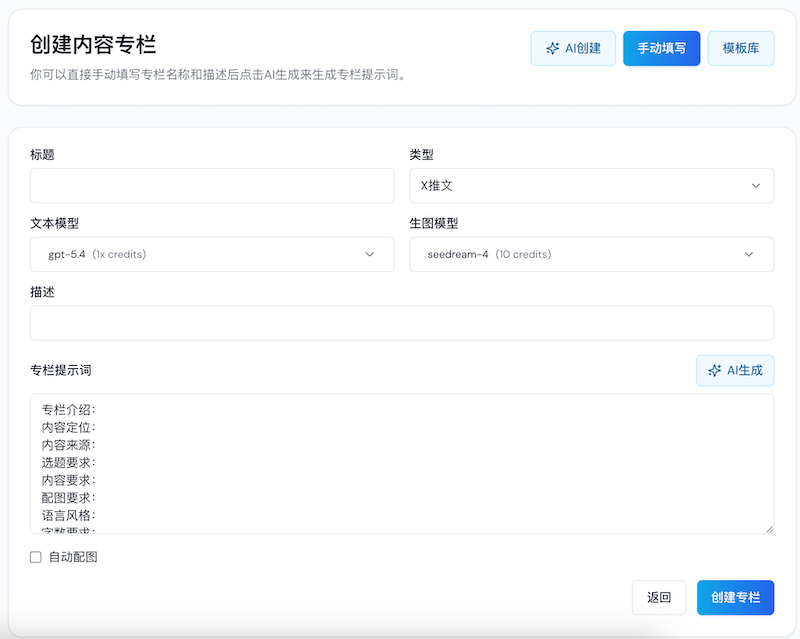
The form may contain several fields, but the ones that usually affect quality the most are:
TitleTypeDescriptionColumn PromptAuto ImagesText ModelImage Model
The most important ones are usually Type, Description, and Column Prompt.
1. Choose the right column type first
It is usually better to split Type by publishing platform instead of mixing everything together.
For example:
X Tweet: short-form content, opinions, trend reactionsX Article: threads, extended explanations, longer lessonsWeChat Article: full structure, clear sections, deeper writingXiaohongshu: image-text posts, card-style layouts, title-led contentSEO Article: structured content built around search intent
If you want to post on both X and WeChat, it is usually better to create two columns. The length, tone, structure, and reader expectations are too different.
2. Write the target audience more specifically
Avoid broad definitions like "for everyone" or "for people interested in AI."
Better examples look more like:
- indie developers focused on growth, global distribution, and AI leverage
- operators or content teams focused on workflow automation and multi-platform distribution
- office workers who want practical, low-friction methods they can apply immediately
The more specific the audience is, the less likely later topic generation is to drift.
3. Make the content goal explicit
Even if two columns are both "about AI," the structure changes a lot depending on the real goal.
You can clarify whether this column leans more toward:
- reach and sharing
- building professional credibility
- product conversion
- teaching practical methods
- long-term search traffic
For example:
- X often leans more toward reach and opinion
- SEO often leans more toward intent coverage and structure
- WeChat often leans more toward trust-building and systematic explanation
4. How to write a better column prompt
Column Prompt is the core configuration of the whole column. It does not need to become complicated prompt engineering, but it should at least cover a few basics.
It is helpful to include:
- what the column is for
- who the audience is
- which themes it focuses on
- what it should avoid
- what style it should follow
- what length and structure it should output
- whether images are needed and what kind of image style fits
Even a natural-language version is often enough, for example:
- This is an X content column for indie developers about AI tools, growth tactics, and going global. The tone should be direct, opinionated, low on fluff, and rich in real examples and actionable methods.
- This is a WeChat article column for office workers who want to learn AI workflows systematically. The style should be tutorial-driven, clearly structured, concrete, and worth saving and sharing.
5. When to turn on auto image generation
You should consider enabling Auto Images first if you mainly create:
- Xiaohongshu image posts
- WeChat articles
- SEO long-form content
- content that needs a cover or explanatory visual
If you are still just validating topic quality and body quality, it is also fine to leave it off for now and add it later.
6. Recommended order for first-time setup
For your first column, this order is usually safer:
- choose the
Type - write the
TitleandDescription - refine the
Column Prompt - decide whether to enable
Auto Images
That tends to work better than trying to pile in every advanced requirement on day one.
Common questions
Does a longer column prompt mean a better one?
No. Clear, specific, and low-conflict is usually more important than long.
Can one column cover multiple platforms?
It can, but if the platform differences are significant, it usually is not recommended. Separate columns tend to be more stable.
If later output feels weak, should I fix the draft or the column settings?
If the same issue appears repeatedly, it is usually better to adjust the Column Positioning and Column Prompt first instead of rescuing each draft one by one.
Next step
Once the positioning is clear, continue with How to Generate Topics.