
Invites and Rewards
Invites and Rewards is where you manage your SoPilot invite link, review invite credit rewards, check referral commissions from orders, and confirm withdrawable balances and withdrawal history.
Quick links
Page screenshot
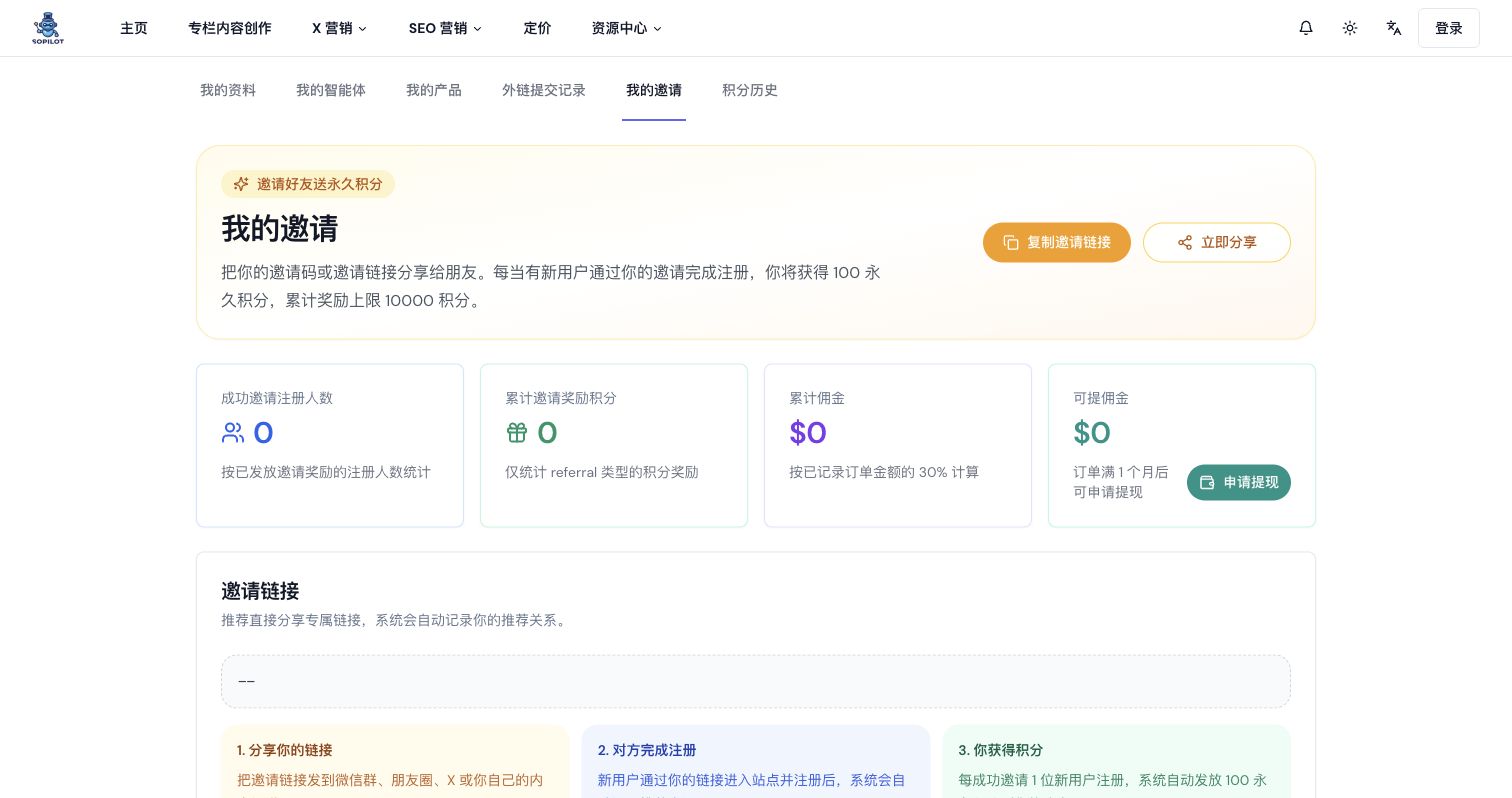
Page overview
The page includes:
- a
Copy Invite Linkbutton - a
Share Nowbutton - invite summary cards
- the invite link display area
- a referral orders table
- an invite rewards table
- a withdrawal history table
Summary card definitions
Successful invited registrations
Counts the number of registrations that already qualified for invite rewards.
Total invite reward credits
Counts the invite credits that have already been granted.
Total commission
Counts all recorded commission from paid orders, calculated at 30% of order value.
Withdrawable commission
Counts the commission amount that already qualifies for withdrawal. Orders become withdrawable after 1 month.
Invite link explanation
The page shows your dedicated invite link along with a 3-step explanation:
- share the invite link
- the other person completes registration
- the system grants the invite reward
If the invite link area shows --, it usually means no link data is currently available.
Table fields
Referral orders
This table usually includes:
- invited user
- plan
- order amount
- commission
- latest payment time
- order status
- withdrawal status
Possible order statuses include:
ValidExpiredPausedCanceledFailedIncompleteTrial
Invite reward records
This table is used to review granted invite credits and usually includes:
- time
- rewarded credits
- description
Withdrawal history
This table is used to review registered withdrawal records and usually includes:
- withdrawal amount
- note
- withdrawal time
Recommended workflow
Step 1: Copy or share the invite link
After opening Invites and Rewards, you can:
- click
Copy Invite Link - or click
Share Now
Share Now tries to use the system sharing capability first. If the environment does not support it, SoPilot falls back to copying the sharing text.
Step 2: Review the summary cards
Check whether these values changed:
- successful invited registrations
- total invite reward credits
- total commission
- withdrawable commission
Step 3: Review referral orders
If you want to confirm where commissions came from, check the referral orders table:
- which user placed the order
- the order amount
- the corresponding commission
- whether the order already qualifies for withdrawal
Step 4: Review reward records
If you need to confirm whether invite credits were granted, check the invite reward records and compare them with Credit History.
Step 5: Apply for withdrawal
When Withdrawable Commission is greater than 0, click Apply for Withdrawal.
The modal currently provides these contact options:
- WeChat:
cheany88 - Email:
[email protected]
You can copy either and contact support for the withdrawal process.
Tips
- share the dedicated invite link instead of manually explaining an invite code
- review the summary cards regularly to monitor invite performance
- once paid orders start appearing, pay closer attention to commission and withdrawal status
- if something looks wrong, compare invite records, credit history, and withdrawal history together
Common questions
Why did someone visit through my link, but I did not see a reward immediately?
Invite rewards are only granted after the system conditions are met. A click or page visit alone does not qualify.
What is the difference between credit rewards and commission payout?
- credit rewards are granted after the invited user completes registration
- commission payouts come later if the invited user places an order
Why is total commission above zero, but withdrawable commission still zero?
Because the rules require the order to age for 1 month before it becomes withdrawable.
Is withdrawal handled automatically?
No. This page currently supports a manual contact-based withdrawal process rather than automatic in-product payout.